Individual Cito sites have their own SSH account and credentials. To SSH into an individual Cito site, you can add a public key to it.
What about SFTP?SFTP uses the same port and authentication details as SSH. You can use your username, SSH key and the server’s IP to log into a site using your SFTP client of choice.
You can assign a key to more than one site, or add a ‘default’ key, that is assigned to all new sites, using the steps below.
Adding a new key
To add a new key, visit the SSH Keys link in the dashboard navigation bar. From here you can view, add and remove keys.
What key typesWe support rsa and ed25519 key types. Any other key type will be rejected.
Click ‘Add new managed key’ and a field will appear for you to paste in your Public key. We automatically populate the key name using the comment, but you can change this if desired.For security reasons we require all newly added keys to be confirmed via email. When you add a new key we automatically email the following:
The account owner
Any contact added to the Prostack Portal. You can add a new contact by following this guide.
You will need to click the “Add Key” button to confirm.
Assigning keys to sites
Once a managed key has been added you can assign it to individual sites for access. You can do this via the Manage sites option for each key, or from the Settings page for a site, by clicking ‘SSH keys’.This page will show you the keys assigned to a site. You can paste in a key to add it.Once a key is added, it will appear in the list and will work for SSH access.
Default keys
Default keys are SSH keys that are automatically assigned to newly created sites. This is controlled by the “Assign to new sites” toggle on each key.When a key is set as default, a notification will appear below it to indicate it will be automatically assigned to new sites.
Deleting keys
There are two ways to delete an SSH key from a site
You can remove individual keys from sites using the “SSH keys” section under ‘Site Settings’
You can also remove a key from the “SSH Keys” page, which deletes it from all sites at once.
What about the admin user?
The admin user has root privileges via the sudo command. For this reason, we do not allow it to be managed via the dashboard.To amend admin keys you can modify authorized_keys via SSH or alternatively contact support for assistance.
{"docsConfig":{"theme":"mint","$schema":"https://mintlify.com/docs.json","name":"Prostack Cito","colors":{"primary":"#1C1F38","light":"#3B4063","dark":"#0F1120"},"logo":{"light":"/logo/logo.png","dark":"/logo/logo.png"},"favicon":"/logo/logo.png","appearance":{"default":"light"},"navbar":{"links":[{"href":"https://feedback.cito.prostack.uk/","label":"Feedback"}],"primary":{"type":"button","label":"Log into Cito","href":"https://cito.prostack.uk"}},"footer":{"socials":{"linkedin":"https://www.linkedin.com/company/prostackhost","x":"https://x.com/prostackhost"}},"integrations":{"telemetry":{"enabled":false}},"navigation":{"pages":[]}},"deployment":{"deploymentMetadataValue":{"hasAudioNarration":false,"customDomains":[],"gitSource":{"type":"github","owner":"local","repo":"local","deployBranch":"main","contentDirectory":"","isPrivate":true,"mountPath":"","label":"local","isBase":true},"buildId":"local","clientVersion":"0.0.4203"},"basePath":"","hasChatPermissions":false,"hasWebMcpPermissions":false,"toggles":[],"googleFontsInlined":false,"isLoggedInCli":false,"mintExport":{}},"customCss":[{"filePath":"style.css","content":":root{--background: #f9f9f9 !important;--bg-background: #f9f9f9 !important;--background-light: 249 249 249 !important;--navbar-background: #f9f9f9 !important}html:not(.dark){background-color:#f9f9f9}html:not(.dark) body{background-color:#f9f9f9}html:not(.dark) #content-container{background-color:#f9f9f9}html:not(.dark) #navbar,html:not(.dark) nav,html:not(.dark) header,html:not(.dark) [class*=\"Navbar\"],html:not(.dark) [class*=\"navbar\"],html:not(.dark) [class*=\"Header\"],html:not(.dark) [class*=\"header\"],html:not(.dark) [class*=\"TopBar\"],html:not(.dark) [class*=\"topbar\"],html:not(.dark) [class*=\"nav-\"],html:not(.dark) [class*=\"scroll\"],html:not(.dark) [class*=\"sticky\"]{background-color:#f9f9f9!important;background:#f9f9f9!important;backdrop-filter:none!important;-webkit-backdrop-filter:none!important}html:not(.dark) [class*=\"Navbar\"]::before,html:not(.dark) [class*=\"Navbar\"]::after,html:not(.dark) header::before,html:not(.dark) header::after,html:not(.dark) nav::before,html:not(.dark) nav::after{background-color:#f9f9f9!important;background:#f9f9f9!important}header a[href=\"/\"],[class*=\"Navbar\"] a[href=\"/\"]{display:inline-flex;align-items:center;gap:0.5rem}header a[href=\"/\"]::after,[class*=\"Navbar\"] a[href=\"/\"]::after{content:\"Cito Documentation\";font-weight:600;font-size:1.1rem;color:#1C1F38;white-space:nowrap}html.dark header a[href=\"/\"]::after,html.dark [class*=\"Navbar\"] a[href=\"/\"]::after{color:white}"}],"page":{"pagePath":"deploying/ssh","slug":"/deploying/ssh","pageMetadata":{"title":"SSH","description":"Manage SSH keys and access for your Cito sites","href":"/deploying/ssh"},"description":{"compiledSource":"\"use strict\";\nconst {jsx: _jsx} = arguments[0];\nconst {useMDXComponents: _provideComponents} = arguments[0];\nfunction _createMdxContent(props) {\n const _components = {\n p: \"p\",\n ..._provideComponents(),\n ...props.components\n };\n return _jsx(_components.p, {\n children: \"Manage SSH keys and access for your Cito sites\"\n });\n}\nfunction MDXContent(props = {}) {\n const {wrapper: MDXLayout} = {\n ..._provideComponents(),\n ...props.components\n };\n return MDXLayout ? _jsx(MDXLayout, {\n ...props,\n children: _jsx(_createMdxContent, {\n ...props\n })\n }) : _createMdxContent(props);\n}\nreturn {\n default: MDXContent\n};\n","frontmatter":{},"scope":{}},"pageType":"default","mdx":{"mdxSource":{"compiledSource":"\"use strict\";const{Fragment:_Fragment,jsx:_jsx,jsxs:_jsxs}=arguments[0];const{useMDXComponents:_provideComponents}=arguments[0];function _createMdxContent(props){const _components={a:`a`,code:`code`,em:`em`,img:`img`,li:`li`,p:`p`,strong:`strong`,ul:`ul`,..._provideComponents(),...props.components},{Heading,Tip}=_components;if(!Heading)_missingMdxReference(`Heading`,true);if(!Tip)_missingMdxReference(`Tip`,true);return _jsxs(_Fragment,{children:[_jsx(_components.p,{children:`Individual Cito sites have their own SSH account and credentials. To SSH into an individual Cito site, you can add a public key to it.`}),`\n`,_jsxs(Tip,{children:[_jsx(_components.p,{children:_jsx(_components.strong,{children:`What about SFTP?`})}),_jsx(_components.p,{children:`SFTP uses the same port and authentication details as SSH. You can use your username, SSH key and the server’s IP to log into a site using your SFTP client of choice.`})]}),`\n`,_jsx(_components.p,{children:`You can assign a key to more than one site, or add a ‘default’ key, that is assigned to all new sites, using the steps below.`}),`\n`,_jsx(Heading,{level:`2`,id:`adding-a-new-key`,children:`Adding a new key`}),`\n`,_jsx(_components.p,{children:`To add a new key, visit the SSH Keys link in the dashboard navigation bar. From here you can view, add and remove keys.`}),`\n`,_jsxs(Tip,{children:[_jsx(_components.p,{children:_jsx(_components.strong,{children:`What key types`})}),_jsxs(_components.p,{children:[`We support `,_jsx(_components.em,{children:`rsa`}),` and `,_jsx(_components.em,{children:`ed25519`}),` key types. Any other key type will be rejected.`]})]}),`\n`,_jsxs(_components.p,{children:[`Click ‘Add new managed key’ and a field will appear for you to paste in your `,_jsx(_components.strong,{children:`Public`}),` key. We automatically populate the key name using the comment, but you can change this if desired.`]}),`\n`,_jsx(_components.p,{children:_jsx(_components.img,{src:`/images/screenshots/sshkeyadd.png`,alt:`SSH Key Add`})}),`\n`,_jsxs(_components.p,{children:[_jsx(_components.strong,{children:`For security reasons we require all newly added keys to be confirmed via email.`}),` When you add a new key we automatically email the following:`]}),`\n`,_jsxs(_components.ul,{children:[`\n`,_jsx(_components.li,{children:`The account owner`}),`\n`,_jsxs(_components.li,{children:[`Any contact added to the Prostack Portal. You can add a new contact by following `,_jsx(_components.a,{href:`https://prostack.uk/portal/index.php?rp=/knowledgebase/102/How-do-I-add-a-new-contact-to-email-in-support-requests.html`,children:`this guide`}),`.`]}),`\n`]}),`\n`,_jsx(_components.p,{children:`You will need to click the “Add Key” button to confirm.`}),`\n`,_jsx(_components.p,{children:_jsx(_components.img,{src:`/images/screenshots/sshmagicemail.png`,alt:`SSH Magic Email`})}),`\n`,_jsx(Heading,{level:`2`,id:`assigning-keys-to-sites`,children:`Assigning keys to sites`}),`\n`,_jsxs(_components.p,{children:[`Once a managed key has been added you can assign it to individual sites for access. You can do this via the `,_jsx(_components.code,{children:`Manage sites`}),` option for each key, or from the Settings page for a site, by clicking ‘SSH keys’.`]}),`\n`,_jsx(_components.p,{children:_jsx(_components.img,{src:`/images/screenshots/assigntosite.png`,alt:`Assign to Site`})}),`\n`,_jsx(_components.p,{children:`This page will show you the keys assigned to a site. You can paste in a key to add it.`}),`\n`,_jsx(_components.p,{children:`Once a key is added, it will appear in the list and will work for SSH access.`}),`\n`,_jsx(_components.p,{children:_jsx(_components.img,{src:`/images/screenshots/existingkeys.png`,alt:`Existing Keys`})}),`\n`,_jsx(Heading,{level:`2`,id:`default-keys`,children:`Default keys`}),`\n`,_jsxs(_components.p,{children:[`Default keys are SSH keys that are `,_jsx(_components.strong,{children:`automatically assigned to newly created sites`}),`. This is controlled by the “Assign to new sites” toggle on each key.`]}),`\n`,_jsx(_components.p,{children:`When a key is set as default, a notification will appear below it to indicate it will be automatically assigned to new sites.`}),`\n`,_jsx(_components.p,{children:_jsx(_components.img,{src:`/images/screenshots/existingkeys-assignnew.png`,alt:`Existing Keys - Assign New`})}),`\n`,_jsx(Heading,{level:`2`,id:`deleting-keys`,children:`Deleting keys`}),`\n`,_jsx(_components.p,{children:`There are two ways to delete an SSH key from a site`}),`\n`,_jsxs(_components.ul,{children:[`\n`,_jsxs(_components.li,{children:[`\n`,_jsx(_components.p,{children:`You can remove individual keys from sites using the “SSH keys” section under ‘Site Settings’`}),`\n`]}),`\n`,_jsxs(_components.li,{children:[`\n`,_jsx(_components.p,{children:`You can also remove a key from the “SSH Keys” page, which deletes it from all sites at once.`}),`\n`]}),`\n`]}),`\n`,_jsxs(Heading,{level:`2`,id:`what-about-the-admin-user`,children:[`What about the `,_jsx(_components.code,{children:`admin`}),` user?`]}),`\n`,_jsxs(_components.p,{children:[`The `,_jsx(_components.code,{children:`admin`}),` user has root privileges via the `,_jsx(_components.code,{children:`sudo`}),` command. For this reason, we do not allow it to be managed via the dashboard.`]}),`\n`,_jsxs(_components.p,{children:[`To amend `,_jsx(_components.code,{children:`admin`}),` keys you can modify `,_jsx(_components.code,{children:`authorized_keys`}),` via SSH or alternatively contact support for assistance.`]})]})}function MDXContent(props={}){const{wrapper:MDXLayout}={..._provideComponents(),...props.components};return MDXLayout?_jsx(MDXLayout,{...props,children:_jsx(_createMdxContent,{...props})}):_createMdxContent(props)}return{default:MDXContent};function _missingMdxReference(id,component){throw new Error(`Expected `+(component?`component`:`object`)+\" `\"+id+\"` to be defined: you likely forgot to import, pass, or provide it.\")}","frontmatter":{},"scope":{"config":{},"pageMetadata":{"title":"SSH","description":"Manage SSH keys and access for your Cito sites","href":"/deploying/ssh"}}},"mdxSourceWithNoJs":null},"mdxExtracts":{"tableOfContents":[{"title":"Adding a new key","slug":"adding-a-new-key","depth":2,"children":[]},{"title":"Assigning keys to sites","slug":"assigning-keys-to-sites","depth":2,"children":[]},{"title":"Default keys","slug":"default-keys","depth":2,"children":[]},{"title":"Deleting keys","slug":"deleting-keys","depth":2,"children":[]},{"title":"What about the admin user?","slug":"what-about-the-admin-user","depth":2,"children":[]}],"codeExamples":{}},"jsLinks":[],"subdomain":"localhost","siteName":"Prostack Cito","title":"SSH - Prostack Cito","navMaps":{"firstHrefInVersion":{},"firstHrefInLanguage":{}},"originalFileLocation":"deploying/ssh.mdx"},"headHtml":"\u003cscript data-mint-head>(function(){var d=document.documentElement,p=null;if(!p){try{p=localStorage.getItem(\"isDarkMode\")}catch(e){}if(p==='true')p='dark';else if(p==='false')p='light';if(p!=='light'\u0026\u0026p!=='dark'\u0026\u0026p!=='system')p=\"light\"}var r=p==='system'?(matchMedia(\"(prefers-color-scheme: dark)\").matches?'dark':'light'):p;d.classList.remove(r==='dark'?'light':'dark');d.classList.add(r);d.setAttribute(\"data-theme-preference\",p)})();\u003c/script>\u003cmeta data-mint-head name=\"description\" content=\"Manage SSH keys and access for your Cito sites\">\u003cmeta data-mint-head name=\"application-name\" content=\"Prostack Cito\">\u003cmeta data-mint-head name=\"generator\" content=\"Mintlify\">\u003clink data-mint-head rel=\"apple-touch-icon\" type=\"image/png\" sizes=\"180x180\" href=\"/favicons/apple-touch-icon.png\">\u003clink data-mint-head rel=\"icon\" type=\"image/png\" sizes=\"32x32\" href=\"/favicons/favicon-32x32.png\">\u003clink data-mint-head rel=\"icon\" type=\"image/png\" sizes=\"16x16\" href=\"/favicons/favicon-16x16.png\">\u003clink data-mint-head rel=\"shortcut icon\" type=\"image/x-icon\" href=\"/favicons/favicon.ico\">\u003cmeta data-mint-head property=\"og:title\" content=\"SSH - Prostack Cito\">\u003cmeta data-mint-head property=\"og:description\" content=\"Manage SSH keys and access for your Cito sites\">\u003cmeta data-mint-head property=\"og:site_name\" content=\"Prostack Cito\">\u003cmeta data-mint-head property=\"og:url\" content=\"https://local./deploying/ssh\">\u003cmeta data-mint-head property=\"og:type\" content=\"website\">\u003cmeta data-mint-head name=\"twitter:card\" content=\"summary_large_image\">\u003cmeta data-mint-head name=\"twitter:title\" content=\"SSH - Prostack Cito\">\u003cmeta data-mint-head name=\"twitter:description\" content=\"Manage SSH keys and access for your Cito sites\">\u003cmeta data-mint-head name=\"msapplication-config\" content=\"/favicons/browserconfig.xml\">\u003cmeta data-mint-head name=\"apple-mobile-web-app-title\" content=\"Prostack Cito\">\u003cmeta data-mint-head name=\"msapplication-TileColor\" content=\"#1C1F38\">\u003clink data-mint-head rel=\"canonical\" href=\"https://local./deploying/ssh\">\u003clink data-mint-head rel=\"alternate\" type=\"application/xml\" href=\"/sitemap.xml\">\u003clink data-mint-head rel=\"alternate\" type=\"text/markdown\" href=\"/deploying/ssh.md\">\u003cscript data-mint-head type=\"application/ld+json\">{\"@context\":\"https://schema.org\",\"@type\":\"WebSite\",\"name\":\"Prostack Cito\",\"publisher\":{\"@type\":\"Organization\",\"name\":\"Prostack Cito\"},\"provider\":{\"@type\":\"Organization\",\"name\":\"Mintlify\",\"url\":\"https://mintlify.com\"}}\u003c/script>","agentPointerHref":"/deploying/ssh.md","siteName":"Prostack Cito","nav":{"groups":[{"group":"Home","pages":[{"title":"Introduction","href":"/index"}]},{"group":"Getting Started","pages":[{"title":"First Steps","href":"/getting-started/index"},{"title":"Generating SSH Keys","href":"/getting-started/ssh-keys"},{"title":"Migrating from another host","href":"/getting-started/migration"},{"title":"Frequently Asked Questions","href":"/getting-started/faq"}]},{"group":"Creating Sites","pages":[{"title":"Adding a New Site","href":"/creating-sites/overview"},{"title":"Installing WordPress","href":"/creating-sites/wordpress"},{"title":"NodeJS Applications","href":"/creating-sites/nodejs"},{"title":"Proxy Pass","href":"/creating-sites/proxy-pass"}]},{"group":"Containers","pages":[{"title":"Container Sites","href":"/creating-sites/docker"},{"title":"Importing from Docker Compose","href":"/creating-sites/docker-compose"},{"title":"Managing Containers","href":"/managing-sites/containers"},{"title":"Services","href":"/managing-sites/container-services"},{"title":"Converting a Proxy Pass Site","href":"/managing-sites/convert-proxy-site"},{"title":"Container Limits","href":"/managing-sites/container-limits"}]},{"group":"Managing Sites","pages":[{"title":"Sites Overview","href":"/managing-sites/overview"},{"title":"Changing PHP Versions","href":"/managing-sites/php-version"},{"title":"Custom Document Roots","href":"/managing-sites/document-root"},{"title":"Preview URLs","href":"/managing-sites/preview"},{"title":"Cloning Sites","href":"/managing-sites/clone"},{"title":"Renaming Sites","href":"/managing-sites/rename"},{"title":"Suspending Sites","href":"/managing-sites/suspend"},{"title":"Deleting Sites","href":"/managing-sites/delete"},{"title":".htaccess Import","href":"/managing-sites/htaccess-import"}]},{"group":"Domains, SSL \u0026 Email","pages":[{"title":"Aliases","href":"/managing-sites/aliases"},{"title":"Redirects","href":"/managing-sites/redirects"},{"title":"Domain Information","href":"/managing-sites/domain-information"},{"title":"SSL Certificates","href":"/cli/ssl"},{"title":"Email","href":"/managing-sites/email"}]},{"group":"Files \u0026 Databases","pages":[{"title":"File Manager","href":"/managing-sites/file-manager"},{"title":"Managing MySQL Databases","href":"/managing-sites/mysql"},{"title":"Database Ownership","href":"/managing-sites/database-ownership"},{"title":"Backups","href":"/managing-sites/backups"}]},{"group":"Security","pages":[{"title":"Password Protection","href":"/managing-sites/password-protection"},{"title":"IP Blocking","href":"/managing-sites/ip-blocking"},{"title":"Bot \u0026 Crawler Blocking","href":"/managing-sites/bot-blocking"},{"title":"Firewall","href":"/managing-sites/firewall"},{"title":"Malware Protection","href":"/managing-sites/security"}]},{"group":"Performance \u0026 Monitoring","pages":[{"title":"Caching","href":"/managing-sites/caching"},{"title":"Analytics","href":"/managing-sites/analytics"},{"title":"Viewing Logs","description":"Access PHP, Nginx, and access logs via the dashboard or command line","href":"/managing-sites/logs"}]},{"group":"Deployment \u0026 Automation","pages":[{"title":"SSH","href":"/deploying/ssh"},{"title":"Working with Git","description":"Deploy code using Git from GitHub, Bitbucket, or other platforms","href":"/deploying/git"},{"title":"Cron Jobs","href":"/managing-sites/crons"},{"title":"MCP Server (beta)","href":"/deploying/mcp"}]},{"group":"Server Configuration","pages":[{"title":"Nginx","href":"/cli/nginx"},{"title":"PHP","href":"/cli/php"}]},{"group":"Account","pages":[{"title":"User Management","href":"/account/authentication"},{"title":"Audit Logs","href":"/account/audit-logs"}]},{"group":"Support","pages":[{"title":"Getting Support","href":"/support/contact"},{"title":"Changelog","href":"/support/changelog"}]}]},"basePath":"","title":"SSH - Prostack Cito","buildId":"3fee6f877672","dynamics":["a74be98ba7"],"chunks":["zoom-image-lightbox-sgQzkCp-.js","lightbox-handle-r17bVUz3.js"]}

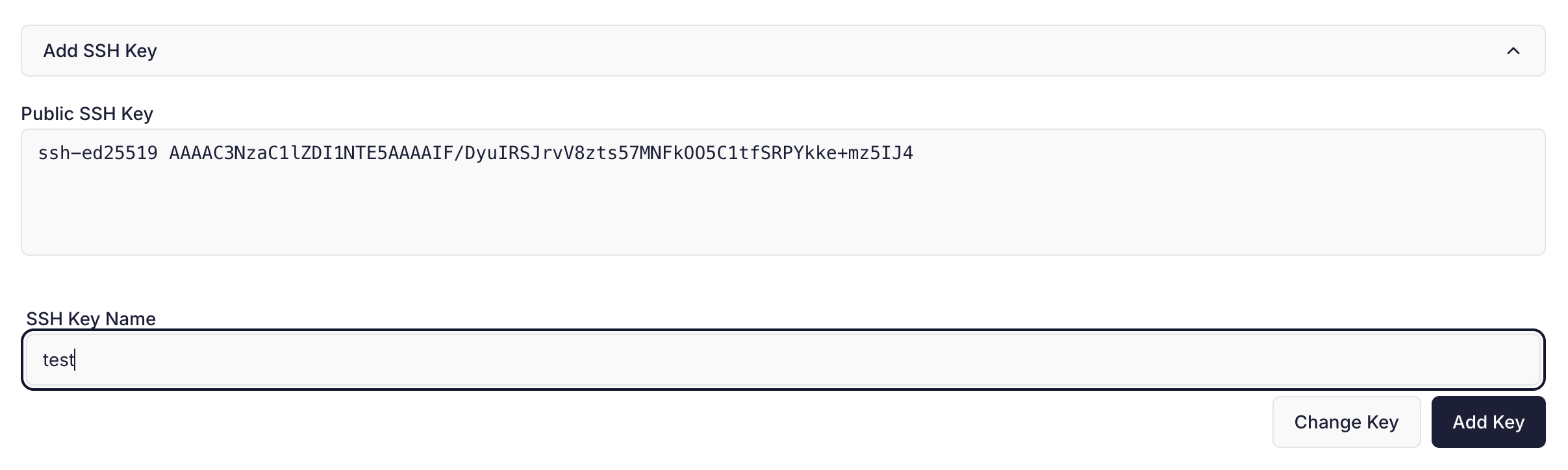 For security reasons we require all newly added keys to be confirmed via email. When you add a new key we automatically email the following:
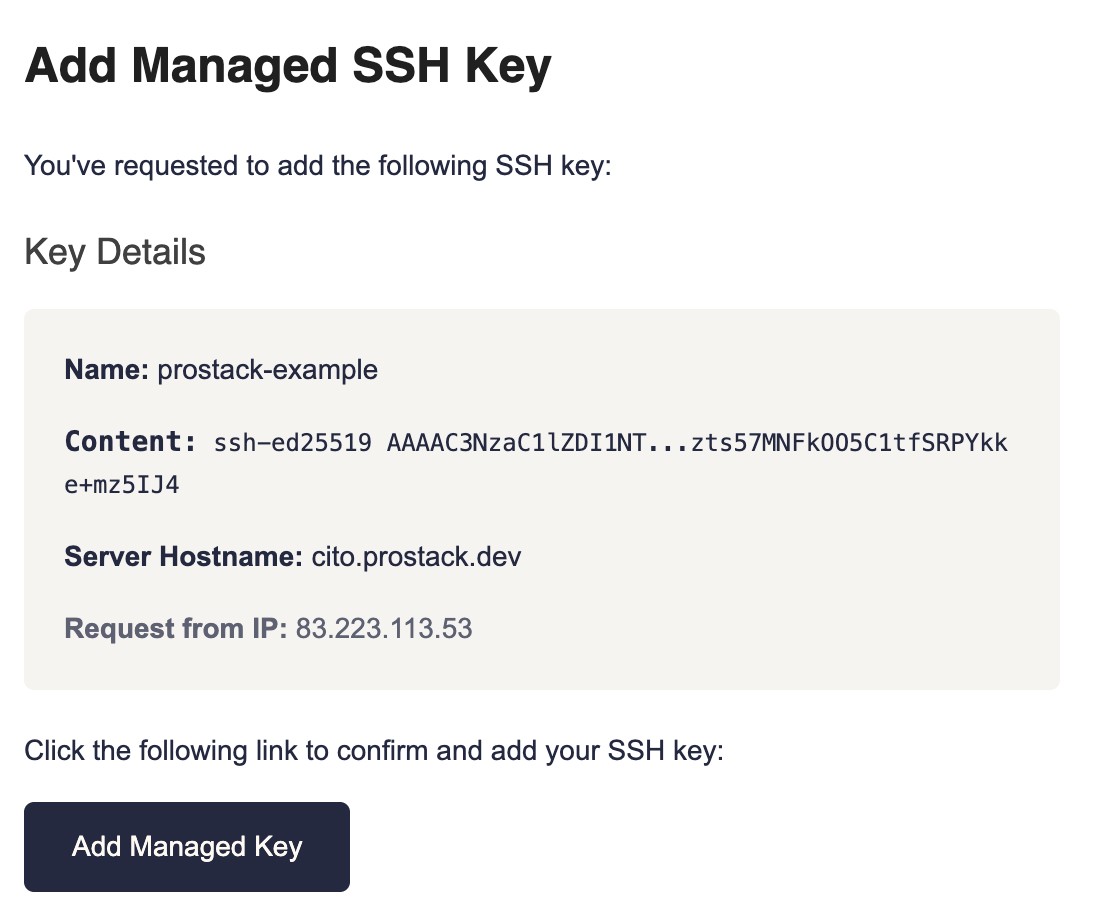
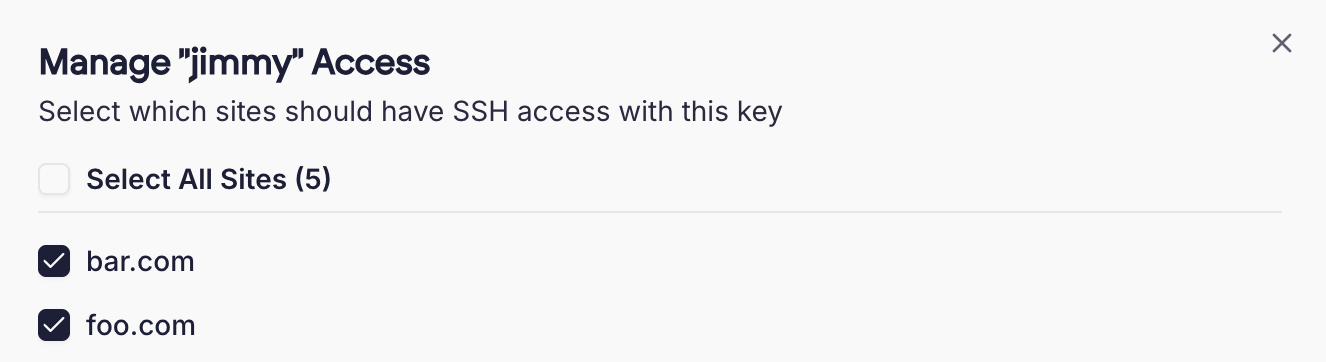 This page will show you the keys assigned to a site. You can paste in a key to add it.
Once a key is added, it will appear in the list and will work for SSH access.

