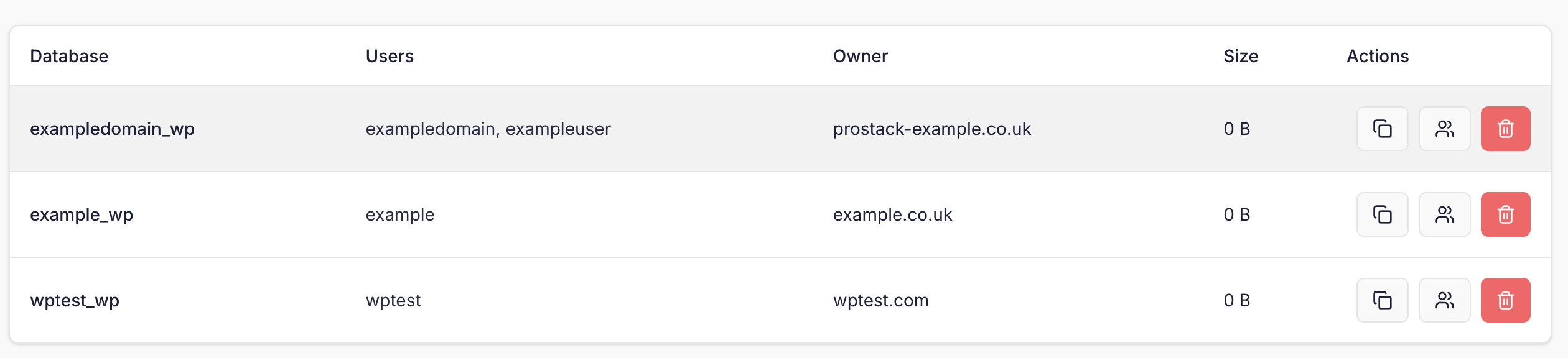
You can manage MySQL databases from Site Settings, or alternatively from the Databases page in the dashboard.You can use the search bar to filter for specific databases. You can also use the ‘All servers’ checkbox to search for databases on other servers, if you have more than one.From Sites, you can navigate to Settings and then the ‘Databases’ section, to see a list of databases owned by that site.To add a new database, simply click the “Create Database” link in the top right corner of the dashboard.You will be prompted for a database name, username and password. The username and password will be automatically generated if left blank.You may also need to select an owner for the database- this is a site that is associated with the database.Once created, you will see the new database details displayed to you.
MySQL passwords are not shownWe do not display MySQL passwords by default- you can click the icon next to the password field to copy it to your clipboard. If you lose access to a MySQL password you’ll need to reset it.
Cloning databases
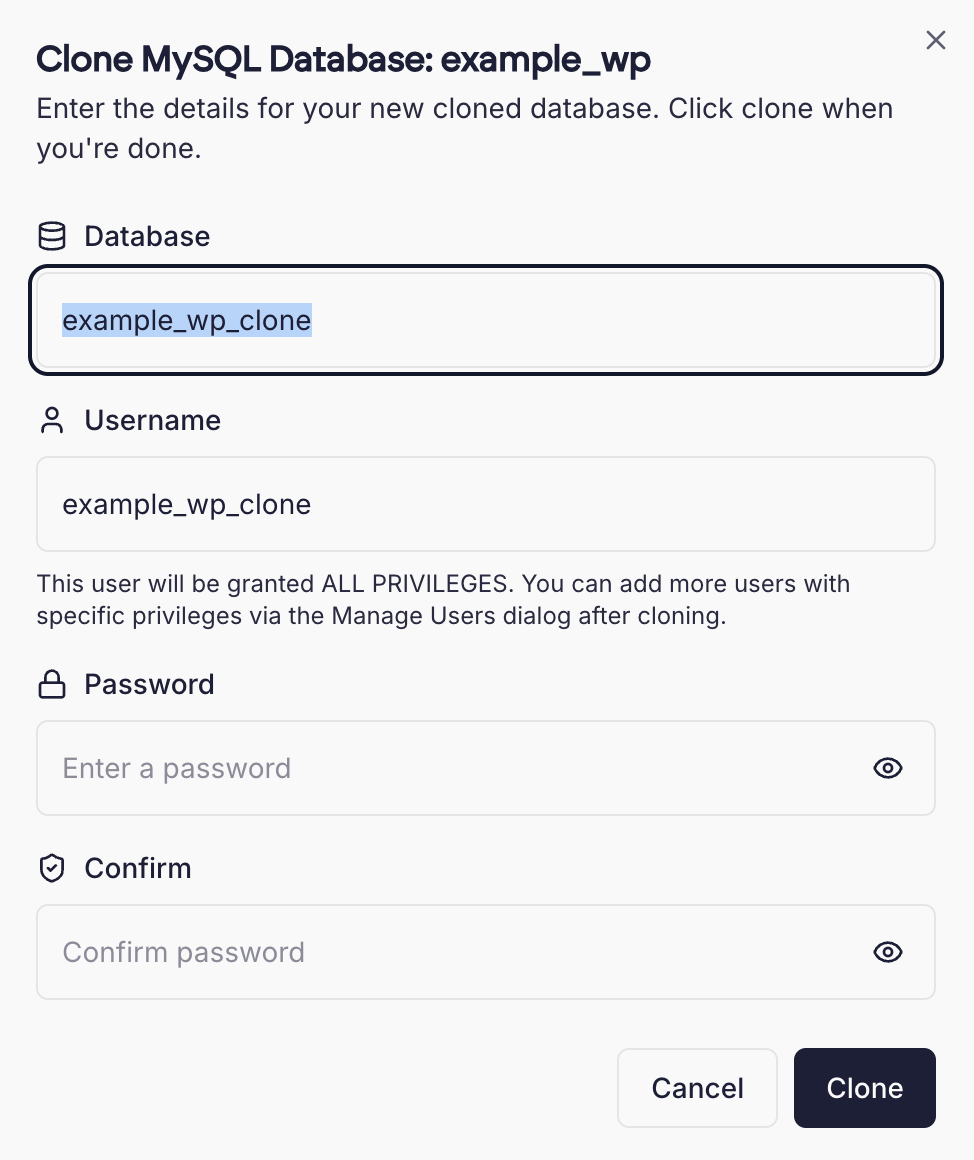
It can be useful to clone a MySQL database, for example if you need a copy of it for testing purposes. Cloning a database generates a new MySQL user. Existing grants and privileges are not copied.To clone a MySQL database, click the Clone icon in the actions menu on the databases page.You’ll need to specify a new username and password for the MySQL user, as well as a new name for the database.Once done, click Clone to start the process. Large databases may take a few moments to complete.
Managing MySQL Users
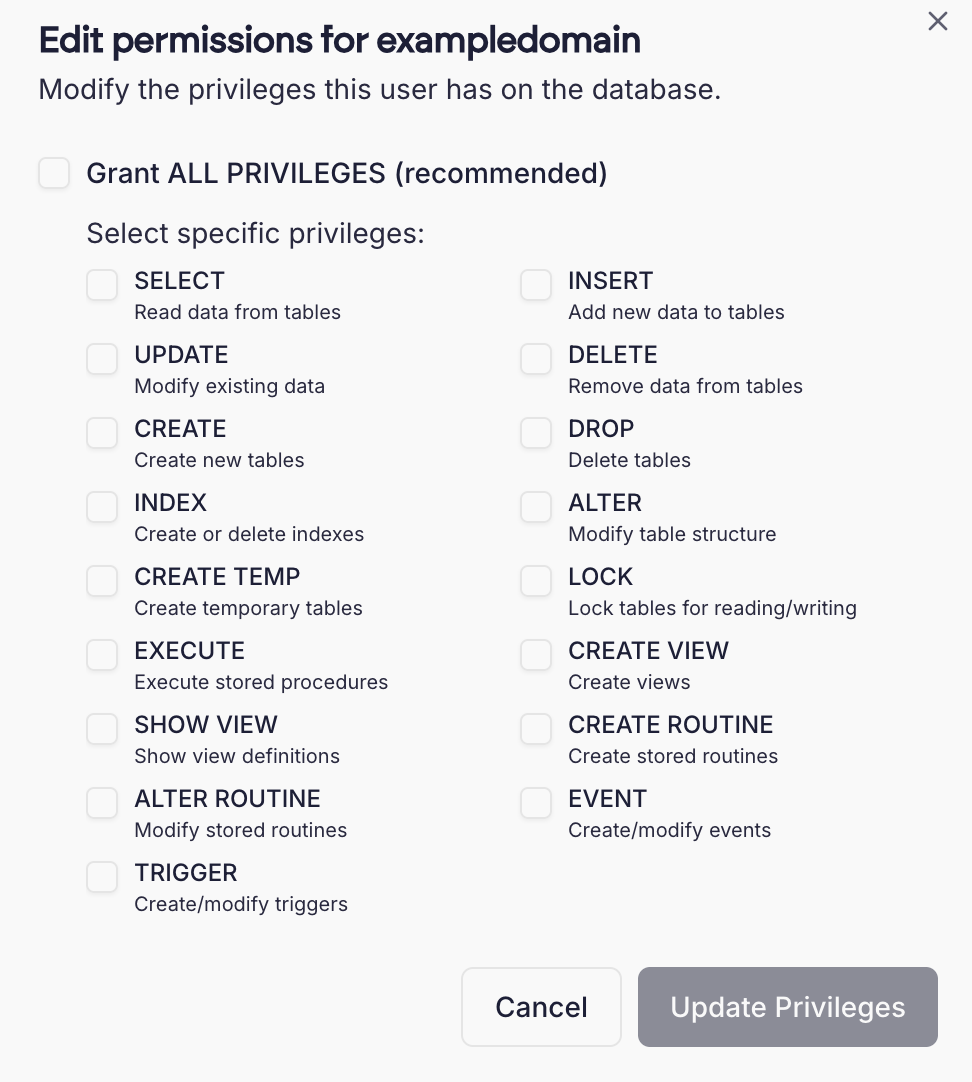
You can manage MySQL users by clicking the User icon next to the database. This will allow you to add additional MySQL users, set permissions, or reset a user’s MySQL password.This also allows you to set specific privileges for MySQL users- for example, you can create a read-only user with only the SELECT privilege on your database.
Using PHPMyAdmin
Some customers may wish to use the ‘PHPMyAdmin’ utility to manage their databases graphically. PHPMyAdmin is accessible from the “Tools” section of the left navigation menu.
Accessing the MySQL command line
You can also perform common MySQL operations at the MySQL command line. You must be logged in as admin to do this.
Importing data from a SQL dump
You may wish to import MySQL data into a newly-created database, using a .sql file created using mysqldump or similar.To do this, issue the following as the admin user.
mysql <dbname> < export.sql
Substitute <dbname> for the database name and export.sql for the filename of your MySQL data.
Connecting from containers
Container sites use the server’s MySQL like any other site. Create the database from the site’s Databases tab, then connect to it from inside your containers using this host:
mysql.cito.internal:3306
The host is also shown at the top of a container site’s Databases tab with a copy button, and in the Host field when you create a database.Connections from containers arrive at MySQL from localhost, so the database users Cito creates work as they are. MySQL is not exposed to the internet.
Remote MySQL database access
For security purposes, remote access to MySQL is disallowed by default. Please contact support if you need to remotely connect to MySQL using a tool such as MySQL workbench or HeidiSQL.
Orphaned databases
In Cito all databases are owned (i.e. associated with) a site. This makes it easy to track what databases belong to a site.We attempt to automatically detect databases and link them to a site, but in some cases this is not possible.If you see a message about an Orphaned database, you can find that database and use the dropdown menu to assign it to a site. This only needs to be done once.More information can be found at Database ownership.
{"docsConfig":{"theme":"mint","$schema":"https://mintlify.com/docs.json","name":"Prostack Cito","colors":{"primary":"#1C1F38","light":"#3B4063","dark":"#0F1120"},"logo":{"light":"/logo/logo.png","dark":"/logo/logo.png"},"favicon":"/logo/logo.png","appearance":{"default":"light"},"navbar":{"links":[{"href":"https://feedback.cito.prostack.uk/","label":"Feedback"}],"primary":{"type":"button","label":"Log into Cito","href":"https://cito.prostack.uk"}},"footer":{"socials":{"linkedin":"https://www.linkedin.com/company/prostackhost","x":"https://x.com/prostackhost"}},"integrations":{"telemetry":{"enabled":false}},"navigation":{"pages":[]}},"deployment":{"deploymentMetadataValue":{"hasAudioNarration":false,"customDomains":[],"gitSource":{"type":"github","owner":"local","repo":"local","deployBranch":"main","contentDirectory":"","isPrivate":true,"mountPath":"","label":"local","isBase":true},"buildId":"local","clientVersion":"0.0.4203"},"basePath":"","hasChatPermissions":false,"hasWebMcpPermissions":false,"toggles":[],"googleFontsInlined":false,"isLoggedInCli":false,"mintExport":{}},"customCss":[{"filePath":"style.css","content":":root{--background: #f9f9f9 !important;--bg-background: #f9f9f9 !important;--background-light: 249 249 249 !important;--navbar-background: #f9f9f9 !important}html:not(.dark){background-color:#f9f9f9}html:not(.dark) body{background-color:#f9f9f9}html:not(.dark) #content-container{background-color:#f9f9f9}html:not(.dark) #navbar,html:not(.dark) nav,html:not(.dark) header,html:not(.dark) [class*=\"Navbar\"],html:not(.dark) [class*=\"navbar\"],html:not(.dark) [class*=\"Header\"],html:not(.dark) [class*=\"header\"],html:not(.dark) [class*=\"TopBar\"],html:not(.dark) [class*=\"topbar\"],html:not(.dark) [class*=\"nav-\"],html:not(.dark) [class*=\"scroll\"],html:not(.dark) [class*=\"sticky\"]{background-color:#f9f9f9!important;background:#f9f9f9!important;backdrop-filter:none!important;-webkit-backdrop-filter:none!important}html:not(.dark) [class*=\"Navbar\"]::before,html:not(.dark) [class*=\"Navbar\"]::after,html:not(.dark) header::before,html:not(.dark) header::after,html:not(.dark) nav::before,html:not(.dark) nav::after{background-color:#f9f9f9!important;background:#f9f9f9!important}header a[href=\"/\"],[class*=\"Navbar\"] a[href=\"/\"]{display:inline-flex;align-items:center;gap:0.5rem}header a[href=\"/\"]::after,[class*=\"Navbar\"] a[href=\"/\"]::after{content:\"Cito Documentation\";font-weight:600;font-size:1.1rem;color:#1C1F38;white-space:nowrap}html.dark header a[href=\"/\"]::after,html.dark [class*=\"Navbar\"] a[href=\"/\"]::after{color:white}"}],"page":{"pagePath":"managing-sites/mysql","slug":"/managing-sites/mysql","pageMetadata":{"title":"Managing MySQL Databases","description":"Create, manage, and clone MySQL databases in Cito","href":"/managing-sites/mysql"},"description":{"compiledSource":"\"use strict\";\nconst {jsx: _jsx} = arguments[0];\nconst {useMDXComponents: _provideComponents} = arguments[0];\nfunction _createMdxContent(props) {\n const _components = {\n p: \"p\",\n ..._provideComponents(),\n ...props.components\n };\n return _jsx(_components.p, {\n children: \"Create, manage, and clone MySQL databases in Cito\"\n });\n}\nfunction MDXContent(props = {}) {\n const {wrapper: MDXLayout} = {\n ..._provideComponents(),\n ...props.components\n };\n return MDXLayout ? _jsx(MDXLayout, {\n ...props,\n children: _jsx(_createMdxContent, {\n ...props\n })\n }) : _createMdxContent(props);\n}\nreturn {\n default: MDXContent\n};\n","frontmatter":{},"scope":{}},"pageType":"default","mdx":{"mdxSource":{"compiledSource":"\"use strict\";const{Fragment:_Fragment,jsx:_jsx,jsxs:_jsxs}=arguments[0];const{useMDXComponents:_provideComponents}=arguments[0];function _createMdxContent(props){const _components={a:`a`,code:`code`,em:`em`,img:`img`,p:`p`,pre:`pre`,span:`span`,strong:`strong`,..._provideComponents(),...props.components},{CodeBlock,Heading,Warning}=_components;if(!CodeBlock)_missingMdxReference(`CodeBlock`,true);if(!Heading)_missingMdxReference(`Heading`,true);if(!Warning)_missingMdxReference(`Warning`,true);return _jsxs(_Fragment,{children:[_jsx(Heading,{level:`2`,id:`using-the-dashboard`,children:`Using the Dashboard`}),`\n`,_jsx(_components.p,{children:`You can manage MySQL databases from Site Settings, or alternatively from the Databases page in the dashboard.`}),`\n`,_jsx(_components.p,{children:`You can use the search bar to filter for specific databases. You can also use the ‘All servers’ checkbox to search for databases on other servers, if you have more than one.`}),`\n`,_jsx(_components.p,{children:`From Sites, you can navigate to Settings and then the ‘Databases’ section, to see a list of databases owned by that site.`}),`\n`,_jsx(_components.p,{children:_jsx(_components.img,{src:`/images/screenshots/databaselist.png`,alt:`DB list`})}),`\n`,_jsxs(_components.p,{children:[`To add a new database, simply click the “Create Database” link in the `,_jsx(_components.strong,{children:`top right corner`}),` of the dashboard.`]}),`\n`,_jsx(_components.p,{children:_jsx(_components.img,{src:`/images/screenshots/createdb.png`,alt:`Create database`})}),`\n`,_jsxs(_components.p,{children:[`You will be prompted for a database `,_jsx(_components.strong,{children:`name`}),`, `,_jsx(_components.strong,{children:`username`}),` and `,_jsx(_components.strong,{children:`password`}),`. The username and password will be automatically generated if left blank.`]}),`\n`,_jsx(_components.p,{children:`You may also need to select an owner for the database- this is a site that is associated with the database.`}),`\n`,_jsx(_components.p,{children:`Once created, you will see the new database details displayed to you.`}),`\n`,_jsxs(Warning,{children:[_jsx(_components.p,{children:_jsx(_components.strong,{children:`MySQL passwords are not shown`})}),_jsx(_components.p,{children:`We do not display MySQL passwords by default- you can click the icon next to the password field to copy it to your clipboard. If you lose access to a MySQL password you’ll need to reset it.`})]}),`\n`,_jsx(Heading,{level:`3`,id:`cloning-databases`,children:`Cloning databases`}),`\n`,_jsxs(_components.p,{children:[`It can be useful to clone a MySQL database, for example if you need a copy of it for testing purposes. Cloning a database generates a new MySQL user. Existing grants and privileges are `,_jsx(_components.em,{children:`not`}),` copied.`]}),`\n`,_jsx(_components.p,{children:`To clone a MySQL database, click the Clone icon in the actions menu on the databases page.`}),`\n`,_jsx(_components.p,{children:_jsx(_components.img,{src:`/images/screenshots/clonedbicon.png`,alt:`Database`})}),`\n`,_jsx(_components.p,{children:`You’ll need to specify a new username and password for the MySQL user, as well as a new name for the database.`}),`\n`,_jsx(_components.p,{children:`Once done, click Clone to start the process. Large databases may take a few moments to complete.`}),`\n`,_jsx(_components.p,{children:_jsx(_components.img,{src:`/images/screenshots/clonedb.png`,alt:`Database`})}),`\n`,_jsx(Heading,{level:`3`,id:`managing-mysql-users`,children:`Managing MySQL Users`}),`\n`,_jsx(_components.p,{children:`You can manage MySQL users by clicking the User icon next to the database. This will allow you to add additional MySQL users, set permissions, or reset a user’s MySQL password.`}),`\n`,_jsxs(_components.p,{children:[`This also allows you to set specific privileges for MySQL users- for example, you can create a read-only user with only the `,_jsx(_components.code,{children:`SELECT`}),` privilege on your database.`]}),`\n`,_jsx(_components.p,{children:_jsx(_components.img,{src:`/images/screenshots/dbprivs.png`,alt:`Database`})}),`\n`,_jsx(Heading,{level:`2`,id:`using-phpmyadmin`,children:`Using PHPMyAdmin`}),`\n`,_jsx(_components.p,{children:`Some customers may wish to use the ‘PHPMyAdmin’ utility to manage their databases graphically. PHPMyAdmin is accessible from the “Tools” section of the left navigation menu.`}),`\n`,_jsx(Heading,{level:`3`,id:`accessing-the-mysql-command-line`,children:`Accessing the MySQL command line`}),`\n`,_jsxs(_components.p,{children:[`You can also perform common MySQL operations at the MySQL command line. You must be logged in as `,_jsx(_components.code,{children:`admin`}),` to do this.`]}),`\n`,_jsx(Heading,{level:`3`,id:`importing-data-from-a-sql-dump`,children:`Importing data from a SQL dump`}),`\n`,_jsxs(_components.p,{children:[`You may wish to import MySQL data into a newly-created database, using a `,_jsx(_components.code,{children:`.sql`}),` file created using `,_jsx(_components.code,{children:`mysqldump`}),` or similar.`]}),`\n`,_jsxs(_components.p,{children:[`To do this, issue the following as the `,_jsx(_components.code,{children:`admin`}),` user.`]}),`\n`,_jsx(CodeBlock,{numberOfLines:`1`,language:`shellscript`,children:_jsx(_components.pre,{className:`shiki shiki-themes github-light-default dark-plus`,style:{backgroundColor:`#ffffff`,\"--shiki-dark-bg\":`#0B0C0E`,color:`#1f2328`,\"--shiki-dark\":`#D4D4D4`},language:`shellscript`,children:_jsxs(_components.code,{language:`shellscript`,numberOfLines:`1`,children:[_jsxs(_components.span,{className:`line`,children:[_jsx(_components.span,{style:{color:`#953800`,\"--shiki-dark\":`#DCDCAA`},children:`mysql`}),_jsx(_components.span,{style:{color:`#CF222E`,\"--shiki-dark\":`#D4D4D4`},children:` \u003c`}),_jsx(_components.span,{style:{color:`#0A3069`,\"--shiki-dark\":`#CE9178`},children:`dbnam`}),_jsx(_components.span,{style:{color:`#0A3069`,\"--shiki-dark\":`#CE9178`},children:`e`}),_jsx(_components.span,{style:{color:`#CF222E`,\"--shiki-dark\":`#D4D4D4`},children:`>`}),_jsx(_components.span,{style:{color:`#CF222E`,\"--shiki-dark\":`#D4D4D4`},children:` \u003c`}),_jsx(_components.span,{style:{color:`#0A3069`,\"--shiki-dark\":`#CE9178`},children:` export.sql`})]}),`\n`]})})}),`\n`,_jsxs(_components.p,{children:[`Substitute `,_jsx(_components.code,{children:`\u003cdbname>`}),` for the database name and `,_jsx(_components.code,{children:`export.sql`}),` for the filename of your MySQL data.`]}),`\n`,_jsx(Heading,{level:`2`,id:`connecting-from-containers`,children:`Connecting from containers`}),`\n`,_jsxs(_components.p,{children:[_jsx(_components.a,{href:`/creating-sites/docker`,children:`Container sites`}),` use the server’s MySQL like any other site. Create the database from the site’s `,_jsx(_components.strong,{children:`Databases`}),` tab, then connect to it from inside your containers using this host:`]}),`\n`,_jsx(CodeBlock,{numberOfLines:`2`,language:`text`,children:_jsx(_components.pre,{className:`shiki shiki-themes github-light-default dark-plus`,style:{backgroundColor:`#ffffff`,\"--shiki-dark-bg\":`#0B0C0E`,color:`#1f2328`,\"--shiki-dark\":`#D4D4D4`},language:`text`,children:_jsxs(_components.code,{language:`text`,numberOfLines:`2`,children:[_jsx(_components.span,{className:`line`,children:_jsx(_components.span,{children:`mysql.cito.internal:3306`})}),`\n`,_jsx(_components.span,{className:`line`,children:_jsx(_components.span,{})})]})})}),`\n`,_jsxs(_components.p,{children:[`The host is also shown at the top of a container site’s `,_jsx(_components.strong,{children:`Databases`}),` tab with a copy button, and in the `,_jsx(_components.strong,{children:`Host`}),` field when you create a database.`]}),`\n`,_jsxs(_components.p,{children:[`Connections from containers arrive at MySQL from `,_jsx(_components.code,{children:`localhost`}),`, so the database users Cito creates work as they are. MySQL is not exposed to the internet.`]}),`\n`,_jsx(Heading,{level:`2`,id:`remote-mysql-database-access`,children:`Remote MySQL database access`}),`\n`,_jsxs(_components.p,{children:[`For security purposes, remote access to MySQL is disallowed by default. Please `,_jsx(_components.a,{href:`/support/contact`,children:`contact support`}),` if you need to remotely connect to MySQL using a tool such as MySQL workbench or HeidiSQL.`]}),`\n`,_jsx(Heading,{level:`2`,id:`orphaned-databases`,children:`Orphaned databases`}),`\n`,_jsx(_components.p,{children:`In Cito all databases are owned (i.e. associated with) a site. This makes it easy to track what databases belong to a site.`}),`\n`,_jsx(_components.p,{children:`We attempt to automatically detect databases and link them to a site, but in some cases this is not possible.`}),`\n`,_jsx(_components.p,{children:`If you see a message about an Orphaned database, you can find that database and use the dropdown menu to assign it to a site. This only needs to be done once.`}),`\n`,_jsxs(_components.p,{children:[`More information can be found at `,_jsx(_components.a,{href:`/managing-sites/database-ownership`,children:`Database ownership`}),`.`]})]})}function MDXContent(props={}){const{wrapper:MDXLayout}={..._provideComponents(),...props.components};return MDXLayout?_jsx(MDXLayout,{...props,children:_jsx(_createMdxContent,{...props})}):_createMdxContent(props)}return{default:MDXContent};function _missingMdxReference(id,component){throw new Error(`Expected `+(component?`component`:`object`)+\" `\"+id+\"` to be defined: you likely forgot to import, pass, or provide it.\")}","frontmatter":{},"scope":{"config":{},"pageMetadata":{"title":"Managing MySQL Databases","description":"Create, manage, and clone MySQL databases in Cito","href":"/managing-sites/mysql"}}},"mdxSourceWithNoJs":null},"mdxExtracts":{"tableOfContents":[{"title":"Using the Dashboard","slug":"using-the-dashboard","depth":2,"children":[{"title":"Cloning databases","slug":"cloning-databases","depth":3,"children":[]},{"title":"Managing MySQL Users","slug":"managing-mysql-users","depth":3,"children":[]}]},{"title":"Using PHPMyAdmin","slug":"using-phpmyadmin","depth":2,"children":[{"title":"Accessing the MySQL command line","slug":"accessing-the-mysql-command-line","depth":3,"children":[]},{"title":"Importing data from a SQL dump","slug":"importing-data-from-a-sql-dump","depth":3,"children":[]}]},{"title":"Connecting from containers","slug":"connecting-from-containers","depth":2,"children":[]},{"title":"Remote MySQL database access","slug":"remote-mysql-database-access","depth":2,"children":[]},{"title":"Orphaned databases","slug":"orphaned-databases","depth":2,"children":[]}],"codeExamples":{}},"jsLinks":[],"subdomain":"localhost","siteName":"Prostack Cito","title":"Managing MySQL Databases - Prostack Cito","navMaps":{"firstHrefInVersion":{},"firstHrefInLanguage":{}},"originalFileLocation":"managing-sites/mysql.mdx"},"headHtml":"\u003cscript data-mint-head>(function(){var d=document.documentElement,p=null;if(!p){try{p=localStorage.getItem(\"isDarkMode\")}catch(e){}if(p==='true')p='dark';else if(p==='false')p='light';if(p!=='light'\u0026\u0026p!=='dark'\u0026\u0026p!=='system')p=\"light\"}var r=p==='system'?(matchMedia(\"(prefers-color-scheme: dark)\").matches?'dark':'light'):p;d.classList.remove(r==='dark'?'light':'dark');d.classList.add(r);d.setAttribute(\"data-theme-preference\",p)})();\u003c/script>\u003cmeta data-mint-head name=\"description\" content=\"Create, manage, and clone MySQL databases in Cito\">\u003cmeta data-mint-head name=\"application-name\" content=\"Prostack Cito\">\u003cmeta data-mint-head name=\"generator\" content=\"Mintlify\">\u003clink data-mint-head rel=\"apple-touch-icon\" type=\"image/png\" sizes=\"180x180\" href=\"/favicons/apple-touch-icon.png\">\u003clink data-mint-head rel=\"icon\" type=\"image/png\" sizes=\"32x32\" href=\"/favicons/favicon-32x32.png\">\u003clink data-mint-head rel=\"icon\" type=\"image/png\" sizes=\"16x16\" href=\"/favicons/favicon-16x16.png\">\u003clink data-mint-head rel=\"shortcut icon\" type=\"image/x-icon\" href=\"/favicons/favicon.ico\">\u003cmeta data-mint-head property=\"og:title\" content=\"Managing MySQL Databases - Prostack Cito\">\u003cmeta data-mint-head property=\"og:description\" content=\"Create, manage, and clone MySQL databases in Cito\">\u003cmeta data-mint-head property=\"og:site_name\" content=\"Prostack Cito\">\u003cmeta data-mint-head property=\"og:url\" content=\"https://local./managing-sites/mysql\">\u003cmeta data-mint-head property=\"og:type\" content=\"website\">\u003cmeta data-mint-head name=\"twitter:card\" content=\"summary_large_image\">\u003cmeta data-mint-head name=\"twitter:title\" content=\"Managing MySQL Databases - Prostack Cito\">\u003cmeta data-mint-head name=\"twitter:description\" content=\"Create, manage, and clone MySQL databases in Cito\">\u003cmeta data-mint-head name=\"msapplication-config\" content=\"/favicons/browserconfig.xml\">\u003cmeta data-mint-head name=\"apple-mobile-web-app-title\" content=\"Prostack Cito\">\u003cmeta data-mint-head name=\"msapplication-TileColor\" content=\"#1C1F38\">\u003clink data-mint-head rel=\"canonical\" href=\"https://local./managing-sites/mysql\">\u003clink data-mint-head rel=\"alternate\" type=\"application/xml\" href=\"/sitemap.xml\">\u003clink data-mint-head rel=\"alternate\" type=\"text/markdown\" href=\"/managing-sites/mysql.md\">\u003cscript data-mint-head type=\"application/ld+json\">{\"@context\":\"https://schema.org\",\"@type\":\"WebSite\",\"name\":\"Prostack Cito\",\"publisher\":{\"@type\":\"Organization\",\"name\":\"Prostack Cito\"},\"provider\":{\"@type\":\"Organization\",\"name\":\"Mintlify\",\"url\":\"https://mintlify.com\"}}\u003c/script>","agentPointerHref":"/managing-sites/mysql.md","siteName":"Prostack Cito","nav":{"groups":[{"group":"Home","pages":[{"title":"Introduction","href":"/index"}]},{"group":"Getting Started","pages":[{"title":"First Steps","href":"/getting-started/index"},{"title":"Generating SSH Keys","href":"/getting-started/ssh-keys"},{"title":"Migrating from another host","href":"/getting-started/migration"},{"title":"Frequently Asked Questions","href":"/getting-started/faq"}]},{"group":"Creating Sites","pages":[{"title":"Adding a New Site","href":"/creating-sites/overview"},{"title":"Installing WordPress","href":"/creating-sites/wordpress"},{"title":"NodeJS Applications","href":"/creating-sites/nodejs"},{"title":"Proxy Pass","href":"/creating-sites/proxy-pass"}]},{"group":"Containers","pages":[{"title":"Container Sites","href":"/creating-sites/docker"},{"title":"Importing from Docker Compose","href":"/creating-sites/docker-compose"},{"title":"Managing Containers","href":"/managing-sites/containers"},{"title":"Services","href":"/managing-sites/container-services"},{"title":"Converting a Proxy Pass Site","href":"/managing-sites/convert-proxy-site"},{"title":"Container Limits","href":"/managing-sites/container-limits"}]},{"group":"Managing Sites","pages":[{"title":"Sites Overview","href":"/managing-sites/overview"},{"title":"Changing PHP Versions","href":"/managing-sites/php-version"},{"title":"Custom Document Roots","href":"/managing-sites/document-root"},{"title":"Preview URLs","href":"/managing-sites/preview"},{"title":"Cloning Sites","href":"/managing-sites/clone"},{"title":"Renaming Sites","href":"/managing-sites/rename"},{"title":"Suspending Sites","href":"/managing-sites/suspend"},{"title":"Deleting Sites","href":"/managing-sites/delete"},{"title":".htaccess Import","href":"/managing-sites/htaccess-import"}]},{"group":"Domains, SSL \u0026 Email","pages":[{"title":"Aliases","href":"/managing-sites/aliases"},{"title":"Redirects","href":"/managing-sites/redirects"},{"title":"Domain Information","href":"/managing-sites/domain-information"},{"title":"SSL Certificates","href":"/cli/ssl"},{"title":"Email","href":"/managing-sites/email"}]},{"group":"Files \u0026 Databases","pages":[{"title":"File Manager","description":"Browse, upload, download and edit files using the built-in file manager","href":"/managing-sites/file-manager"},{"title":"Managing MySQL Databases","href":"/managing-sites/mysql"},{"title":"Database Ownership","description":"How Cito tracks MySQL database ownership and handles orphaned databases","href":"/managing-sites/database-ownership"},{"title":"Backups","href":"/managing-sites/backups"}]},{"group":"Security","pages":[{"title":"Password Protection","href":"/managing-sites/password-protection"},{"title":"IP Blocking","href":"/managing-sites/ip-blocking"},{"title":"Bot \u0026 Crawler Blocking","href":"/managing-sites/bot-blocking"},{"title":"Firewall","href":"/managing-sites/firewall"},{"title":"Malware Protection","href":"/managing-sites/security"}]},{"group":"Performance \u0026 Monitoring","pages":[{"title":"Caching","href":"/managing-sites/caching"},{"title":"Analytics","href":"/managing-sites/analytics"},{"title":"Viewing Logs","href":"/managing-sites/logs"}]},{"group":"Deployment \u0026 Automation","pages":[{"title":"SSH","href":"/deploying/ssh"},{"title":"Working with Git","href":"/deploying/git"},{"title":"Cron Jobs","href":"/managing-sites/crons"},{"title":"MCP Server (beta)","href":"/deploying/mcp"}]},{"group":"Server Configuration","pages":[{"title":"Nginx","href":"/cli/nginx"},{"title":"PHP","href":"/cli/php"}]},{"group":"Account","pages":[{"title":"User Management","href":"/account/authentication"},{"title":"Audit Logs","href":"/account/audit-logs"}]},{"group":"Support","pages":[{"title":"Getting Support","href":"/support/contact"},{"title":"Changelog","href":"/support/changelog"}]}]},"basePath":"","title":"Managing MySQL Databases - Prostack Cito","buildId":"3fee6f877672","dynamics":["a74be98ba7"],"chunks":["zoom-image-lightbox-sgQzkCp-.js","lightbox-handle-r17bVUz3.js"]}

 To add a new database, simply click the “Create Database” link in the top right corner of the dashboard.
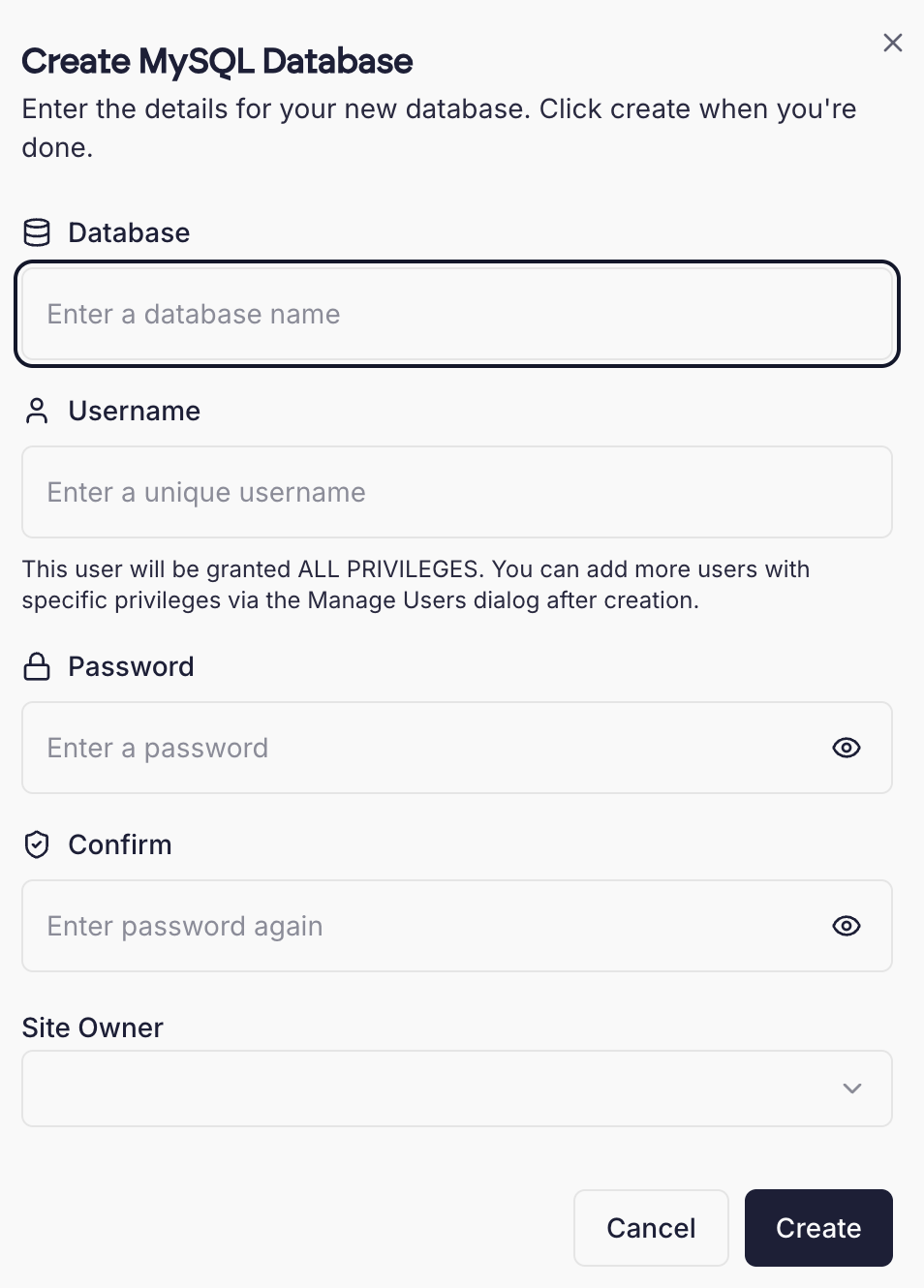 You will be prompted for a database name, username and password. The username and password will be automatically generated if left blank.
You may also need to select an owner for the database- this is a site that is associated with the database.
Once created, you will see the new database details displayed to you.
 You’ll need to specify a new username and password for the MySQL user, as well as a new name for the database.
Once done, click Clone to start the process. Large databases may take a few moments to complete.